Friday, September 18, 2009

Very Powerful Guitar Chords

Sorry Picture Not Found

AC/DC - Now there's some very nice powerful rock music.

We can get a bit of power into our own guitar by using "Power Chords".
There is plenty of information about these chords on the internet, and here is Passy World's pick of some good material to aid your guitar education.

Power Chords are basically 2 or 3 notes that have been taken from a barre chord, and are played as a group on electric guitar, with distortion or overdrive liberally applied. They are the basis of many rock songs, and musically they are based on 5th intervals.

Here is an 8 minute movie from YouTube about the basics of Power Chords:


Here is a really good explanatory written lesson about Power Chords on a web page:
http://www.guitarchordsmagic.com/basic-guitar-chords/guitar-power-chords.html

This same site has a good summary page of Power Chord Diagrams that can be printed out. This printable Power Chords Chart is located at the address:
http://www.guitarchordsmagic.com/guitar-chord-charts/guitar-chord-chart-power.html

This lesson about Notes on the neck will help visualise how we move up and down the neck on the E and A strings to form Power Chords:


Here is a rundown on how to create 3 note power chords, from their corresponding Barre chord:


Here is a summary diagram of standard 2 note Fifths Power Chords:

Sorry Picture Not Found


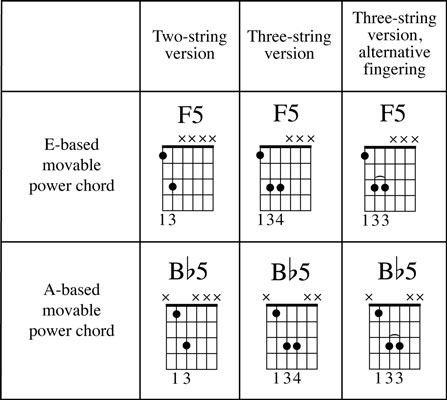
Here is a diagram that shows the relationship between 2 note and 3 note power chords:
Sorry Picture Not Found

Here is an interesting written lesson that has some big open string power chords on it : http://www.guitartutorialsnow.com/articles/how-to-play-power-chords-easily

Here is a 9 minute Power Chords for Blues Guitar video for beginners with Jennifer Gamble from "Next Level Guitar":


Here is another great 8 minute video from "Next Level Guitar" with Marty showing us how to do AC DC style Power Chords:


So get onto your Guitar and start unleashing the Power !

Enjoy,
Big Passy Wasabi

Tuesday, September 15, 2009

Gracefully Identifying any Tune

Sorry Picture Not Found

Whenever I use Itunes, or Creative Media Player, or Winamp, to play an audio CD or any MP3 files, on my computer at home, a "Gracenote" icon briefly appears on the screen, and instantly all of the artist and track information appears displayed in the media player.

I have been amazed by what Gracenote can identify. Any CD that is placed into the home PC is usually fully identified, even Hal Leonard CD's that accompany learning guitar books are fully detailed with all track names. The other amazing thing is the speed at which Gracenote links to the internet and completes this task.

I have been wondering for a while what exactly Gracenote is all about, and so I decided to research this matter further.

Here is information about the Gracenote music identification process from the
Gracenote website at : http://www.gracenote.com .

Gracenote "MusicID" is the industry standard for digital music identification for both CDs and individual music files.

Gracenote MusicID® provides fast, accurate, and reliable music-related content for people all over the world. Gracenote's technology is relied on by many of the world's leading consumer electronic devices and media software applications. Gracenote MusicID uses a multi-step recognition method to enable identification, categorization, and organization of digital music. Regardless of source or format, Gracenote® gives music fans the tools to manage and enjoy their music collections.

As of 2009, Gracenote databases held information on nearly 100 million audio tracks and more than a million videos.

The Gracenote Media Database supports both networked and embedded applications for the home, car, portable, and mobile phone markets. It's the world's largest global media database of music and video metadata.

Gracenote pioneered CD recognition technology in 1995 under the name CDDB®.

In addition to the original audio CD track and artist recognition services, Gracenote now also provides:

MusicID File (Search by File Fingerprint) - A digital audio file tagging service that computes an acoustic fingerprint for MP3 and other audio files and matches it against a fingerprint database.

MusicID Stream (Search by Audio Fingerprint) - Similar in concept to MusicID File, this service computes a more robust acoustic fingerprint in order to identify a song by listening to a sample anywhere in the middle.

VideoID DVD, VideoID Blu-Ray, VideoID File - The video counterparts to the audio services for obtaining meta-data about a disc or TV episode. Like music CDs, table of contents data are used to identify DVD and Blu-ray discs, and a video fingerprint is used to identify video files.

There is a good interview with one of the founders of the original Gracenote company at this address:

http://www.wired.com/entertainment/music/commentary/listeningpost/2006/11/72105

Gracenote is based in California and was aquired by Sony corporation for
$ US 260 million in June 2008.

Itunes and Winamp


Both the Itunes and Winamp music players utilise Gracenote.

We can download Winamp for free from : http://www.winamp.com/player .

Winamp runs Gracenote, connecting to the Internet, and performs a search whenever we put a CD into the PC. For example, here are the results for an Aerosmith compilation CD that I made for driving in the car.
(Yes I do own all the original CDs, as I quite like Aerosmith).


Sorry Picture Not Found


Gracenote "Lyrics to Go"

Gracenote "Lyrics to Go" is a web page widget that puts a search engine onto our blog or web page like the one shown below:


Try out a search in the above window by typing in "fire in the sky" and clicking the search button. ("Smoke on the Water" by Deep Purple should be found, along with several other songs that also contain these same words).

If we then click on the "Smoke on the Water" song title that is displayed, a new window will open that will contain the full set of lyrics to the song.

Alternatively, we can perform the Lyrics Search at the Gracenote Website:

http://www.gracenote.com/lyricstogo/ .

With Gracenote's Lyrics To Go search widget, we have instant access to the world's largest legal database of lyrics. It's simple to implement onto any webpage and lets users search by Lyric Text, Artist Name, or Track Name.

Lyrics to Go is a great way to identify a song's title and Artist, if we only know a few of the words to a song. This is often the case where we might have heard a great song on the car radio, but can only remember the chorus line.

For example,typing in "get your motor running" soon brings up: "Steppenwolf - Born to be Wild", as well as the lesser known : "Shasta Beast - Eagles of Death Metal", which also contains these exact same words.

If we cannot find the lyrics we need using Gracenote, another great site for song lyrics can be found at: http://www.lyricsmode.com .


Gracenote Music Map

There is also the Gracenote "Music Map" http://www.gracenote.com/map/ that shows what music is currently popular in different countries and states anywhere around the world.

Click a country on the map below, and then scroll to the right to see the current
Top 10 Artists and Albums. (Or use the link above to go to full page view).


For example here are the results of a recent check of the latest Top 10 Artists and Albums in Iceland :

Sorry Picture Not Found

So where ever you are in the world, Gracenote is there to help guide your musical journey.

Enjoy,
Big Passy Wasabi

Friday, September 11, 2009

Flash Bunnies Movies Parody


Click the above picture to watch a 30 second parody of the James Bond genre of movies.

The "Flash Bunnies" star in a set of movie parodies, and have even won prestigious "Webby Awards".

There are many well known movies to choose from, and all are delightfully re-enacted by "bunny" like characters in a tight 30 second timeframe.


plus many others, with new movies constantly being added.

The full set of Bunnies Movies can be found and viewed at the "Angry Alien" home page located at: http://www.angryalien.com .

May I suggest that you visit this page and watch a few of these amazing feats of flash, and who knows, you may even get a good laugh or two.

Enjoy,
Big Bunny Passy Wasabi

MJW's Flash AS 3.0 Avoider Game


The Michael James Williams Avoider Game was built from a multi-part set of Tutorials that start on this webpage:

http://avoidergame.com/category/base-tutorials/page/2/

and continue to a conclusion at the top of this page:

http://avoidergame.com/category/base-tutorials/

The tutorials run down the page from final part to beginner part, and so we have to go to the very bottom of page 2 to get to the very first tutorial.

We have to be careful when going through the listed Tutorials, because some are written in the old Actionscript 2.0, and the others are the latest Actionscript 3.0 (AS3) tutorials.

There is a page that has a master index of all the AS 3.0 steps at:

http://gamedev.michaeljameswilliams.com/2008/09/17/avoider-game-tutorial-1/

and I suggest that people use this page to access the tutorials and build the game.


The game being reviewed here was developed in Adobe Flash Actionscript 3.0 and Michael does a great job of building the game up step by step with brilliantly detailed instructions and explanations.

In total there are 12 tutorials that sequentially build up the full game in AS 3.0 :

AS3 Avoider Game Tutorial, Part 1: Basic Set Up
AS3 Avoider Game Tutorial, Part 2: Multiple Smiling Enemies
AS3 Avoider Game Tutorial, Part 3: Game Over
AS3 Avoider Game Tutorial, Part 4: Menus and Buttons
AS3 Avoider Game Tutorial, Part 5: A Score and a Clock
AS3 Avoider Game Tutorial, Part 6: Several Small Improvements
AS3 Avoider Game Tutorial, Part 7: Keyboard Control
AS3 Avoider Game Tutorial, Part 8: Adding a Preloader
AS3 Avoider Game Tutorial, Part 9: Music and Sound Effects
AS3 Avoider Game Tutorial, Part 10: Multiple Levels
AS3 Avoider Game Tutorial, Part 11: Saving and Loading
AS3 Avoider Game Tutorial, Part 12: Garbage Collection

Doing these tutorials is a great fun way to learn ActionScript 3.0.

In the "Alien Game" at the start of this Blog post, we have only completed parts 1 to 6 of the above Tutorials, due to time constraints.

(Eg. Have to eat sleep work play guitar, and do other stuff as well).

Sometime later on it would be fun to add the other parts to the game, especially bonus objects (like coins or jewels) that the green alien could bump into and collect to earn extra game points. Levels and Lives would also be great.

The instructions on the MJW website are fully detailed, and he has a nice copy to clipboard feature on all of the code snippets which saves a lot of typing time.

He also has downloadable zip files for each part, so that when things are not working, we can download his AS 3.0 Class files, and compare them line by line with our own code.

If you would like to download the .FLA Source file, as well as all of the AS 3.0 class files for the Passy World version of the game, then click the link below:

Click Here to Download .RAR file of Source Code from Passy World

There is another page, where we can play amazing variations of his Avoider Game that people have developed, such as a great game called "Robot Saga: Escape". These games can be found and played online at the Avoider Game homepage at: http://avoidergame.com/ .

Michael James Williams is definitely one of the flashest game programming teachers to be found on the Net.

Passy World rates his tutorials as 12/10 !

So stop avoiding Actionscript 3.0, and get right into it !

Enjoy,
Big Passy Wasabi

Thursday, September 10, 2009

Flashy Free Guitar Accessories


The above interactive Flash Animaton is a free online guitar tuner from "hotfrets".

We can click on a string, and it will sound, so that we can tune our guitar.
We can also download this tuner from the hotfrets site to our desktop.

The "hotfrets" site is located at: http://www.hotfrets.com/.

It has quite a few nice guitar learning tools, that have all been created using Adobe Flash. Some are for free, but the others require a monthly membership fee.

A cut down version of their full Tabulature writer is also supplied on the site, and shown below:


We can click on the guitar fretboard where the notes are that we want to play, and then it will write the tab for the notes underneath on the six string lines.

Try it out by clicking on the fretboard above.

A really nice thing is that once the current tabline is full, we can highlight it, and use Ctrl-C to copy it into memory. We can then Ctrl-V paste it into Notepad, and save the tab for later printing. We can clear the tabulator, continue the tab, and then copy and paste this into our notepad document. So it is indeed a very user-friendly tab writing tool.


There is also the "Progressionator" that can be used online for free, and will supply chord progressions and rythms for the standard patterns listed.

Try it out below:
(Note that you may have to use the scroll bars get it into view).
or you could just click this link: http://www.hotfrets.com/songanator.asp


There is also the "Arpeggiator" that can be used online for free, and will supply all of the notes that make up a particular chord.
The notes are shown on the neck, and can be plucked with the mouse pick.

Try it out below:
(Note that you may have to use the scroll bars get it into view).
or you could just click this link: http://www.hotfrets.com/chords/arpeggiator_free.asp


There are also a few free lessons at the site such as Eric Clapton "Cross Roads"
at : http://www.hotfrets.com/lesson_details.asp?LID=50

If you need a free online metronome then try these links:

http://www.metronomeonline.com/
http://webmetronome.com/
http://bestmetronome.com/
http://advanced.bestmetronome.com/

The advanced metronome is almost like a mini online drum machine.

The Guitar Tuner, Tab Writer, Progressionator,and how to play songs items at hotfrets have all been created using Adobe Flash. I show them to my computing students as examples of the extent of the power of Flash.

Music naturally runs in a timeline when it plays, and so Flash is well suited for graphically representing music and translating it to Guitar tabulature.

Enjoy,
Big Strumming Passy Wasabi

Tuesday, September 8, 2009

Free Interactive Fun Mathematics


The "National Library of Virtual Manipulatives" ("NLVM") is a set of resources that run as interactive online mathematical demonstrations, puzzles, and games.

(The above image is a solved puzzle where the geometrical shapes had to be arranged in a certain red and blue repeating pattern).

Mathematics is not a spectator sport. All too often, traditional instruction fails to actively involve students. One way to address the problem is through the use of manipulatives, physical objects that help students visualize relationships and applications. This is what the "NLVM" hopes to provide.

The "NLVM" Homepage is located at
http://nlvm.usu.edu/ .

This index page consists of a matrix of options for different branches of maths, mapped agianst different year levels. We simply position our mouse on the square we want (for example Year 6-8 Algebra), and then click to go the the list of resources.

Here is a window into the actual home page:
(Use the horizontal scroll bar to see the Y9-12 column)


Basically, using the "NLVM" is simply a matter of getting in there
and then picking and clicking to explore how the different items work.

For example, here is an interactive Algebra Factor Tree :

(Enter numbers into the window below to try out building the factor tree)


If we scroll down to the bottom of the tree, we can change from "Computer" to "User" and enter our own numbers to factorise. We can also do two factor trees per screen if we want to.

Here is a view of all of the items that are contained in Level 6-8 Algebra


Here is a nice Coin Toss simulator and analyser for Probablility:
(Press the "Start" button and let the simulator run to completion).


There is lots more to explore in the "NLVM", and so why not ditch the Maths books for a lesson and check it out.

Enjoy,
Big Passy Wasabi

The Day the Megabytes Ran Out

Sorry Picture Not Found

A picture that is worth at least a thousand bytes.

Sadly there has been no internet for several days here at Passy World, because we overshot our monthly gigabyte download limit.
(See above graphs).


What pushed things over the limit was the weekend we finished building and setting up the new gaming computer. Setting up this new PC involved downloading several gigabytes of patches for all of our games, as well as a lot of Adobe updates.

But in the end it has all been well worth the effort, because the gaming performance of the new machine is superb !

(Click here to go to previous blog post about our super Gaming PC).

Anyway, we are finally into the new billing month and back online again, so get ready for plenty of new blog posts coming your way real soon !

Enjoy,
Big Passy Wasabi