Showing posts with label Mathematics. Show all posts

Sunday, October 11, 2009

How Guitar Pedals Work

Sorry Picture Not Found

Okay then, let's look at how some of these great guitar pedals work.

Sorry Picture Not Found

Shown above are some basic "sinusoidal" shaped sound waves. Our ear detects these when music is played. Various "Guitar Pedals" or "Stomp Boxes" can be used to modify these basic sound waves to create new and interesting sounds.

The mathematics of sinusoidal shaped waves involves the trigonometry of right angled triangles. This is illustrated very nicely by the following diagram:
(Copyright Russell Kightley - www.rkm.com.au - used with permission)


Sorry Picture Not Found

Russell also has a brilliant animation of the sine wave being generated, as the radius of a circle is moved in a manner which continually alters the sine value of the angle. (it also cleverly illustrates Cosine at the same time).

Go to the following link to view this sine wave animation:
http://www.rkm.com.au/ANIMATIONS/animation-sine-wave.html

Russell also has many other amazing animations and images at his website:
http://www.rkm.com.au
(Check it out, especially the scientific drawings of influenza viruses).

In this post we will look at "Chorus" and "Distortion", and how the mathematics of wave re-shaping works for these two sound effects.

Chorus Effect

If we add in extra sound waves that are of similar shapes, all around the original sound wave, then we create the classic guitar “CHORUS” sound effect. This makes things sound like more than one guitar is playing and is often said to fill out and "color" the sound.
Sorry Picture Not Found
In the world of guitar effects chorus makes one guitar sound like multiple guitars playing the same thing in unison. Just as each singer in a chorus would have different voices that blend, a chorus effect for a guitar will sound like different guitars all playing together.

This is demonstrated in the two sound samples below.

Press the play button of the mini-player on each one to hear the guitar play, both with and without Chorus effect applied.


Distortion Effect

Distorted Heavy guitar sound occurs when smooth Sine Waves are mathematically transformed into Square shaped, Sawtooth, and Triangle shaped waves. This is shown in the animation below:

Sorry Picture Not Found

Basic Distortion effect is demonstrated in the two sound samples below.

Press the play button of the mini-player on each one to hear the guitar play, both with and without Distortion effect applied.


The sounds in this post were made using "Magix Music Maker 15".

Sorry Picture Not Found

Magix Music Maker is only about $50 AUD to buy on eBay and is a marvelous set of sound loops and song making software that is so nice and easy to use. We will be doing a full review of MM15 in an upcoming post.

But in the meantime, get into stomping on those pedals, and make a myriad of marvelous sounds with your guitar. I know that's what I'll be doing this week :)


Enjoy,
Big Passy Wasabi

Sunday, October 4, 2009

Wall Wisher Trigonometry


Tomorrow my Year 9 maths students get introduced to Trigonometry for the first time, and so they will need an online 24x7 online web-based Help site.

Good old "Wall Wisher" to the rescue, and this time we built the whole wall in one session, and did not move any post it notes around. This resulted in no problems or glitches whatsoever, and so this approach is definitely the one to use when building walls.

Note that we had previously done all our Internet research and had all the links and items we wanted to put onto the wall in a notepad text file.

If you would like to see the wall full size, then click this link:
http://www.wallwisher.com/wall/trigonometry9

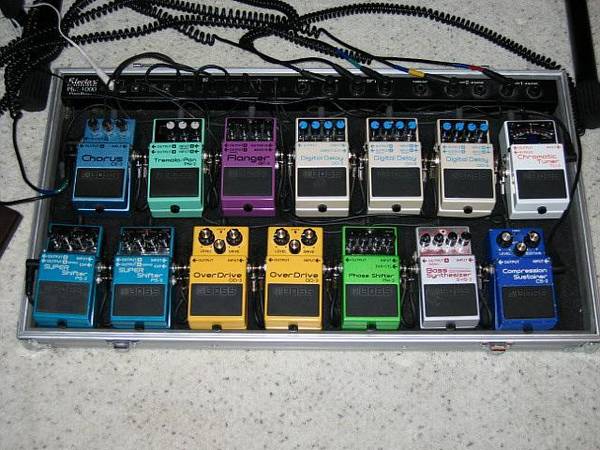
The best thing about Trig are the sine shaped sound wave graphs, and even better than this is the electronic manipulation of these sound waves by electronic sound effects pedals like these ones right here:

Sorry Picture Not Found
Just about my dream collection of Boss beauties right there for sure.


So that's about it, and now it's time for us to "sine" off :)

Enjoy,
Big Passy Wasabi

Thursday, September 24, 2009

Wolfram Mathematica Demos

Sorry Picture Not Found

The above picture is not a bizzarre test pattern or color palette, but is a "Geometric pattern of Congruence" produced using Wolfram Mathematica.

So What exactly is Wolfram Mathematica ?

The full blown "Wolfram Mathematica" is powerful computer software that has to be purchased for several hundred US dollars.

However there are some great pre-made free demonstrations which can be downloaded to our own PC, and then played using the free Wolfram Player.

(We also have to download the Wolfram Player as detailed later).

From their own website, they describe Wolfram as follows:

Founded by Stephen Wolfram in 1987, Wolfram Research is one of the world's most respected software companies, and a well known powerhouse of scientific and technical innovation.

At the center is “Mathematica”: Wolfram’s core product that launched modern technical computing and has now become the world's most powerful global computation system. With millions of dedicated users throughout the technical and educational communities, “Mathematica” represents a unique blend of major research breakthroughs, outstanding user-oriented design, and world-class software engineering.


The "Wolfram Demonstrations" website page is at:

http://demonstrations.wolfram.com/

These mathematical demonstrations can be previewed and then downloaded.

However, to play them and use their control sliders, we need the "Wolfram Mathematica Player" installed, and this can be easily downloaded for free on the demonstrations page.

On the demonstration we are viewing, in the top right hand corner, there should be a clickable download symbol that looks like this:

Sorry Picture Not Found

We can click this symbol and download and install the free player onto our computer.


For Mathematics Teachers:

The idea is to search and find a demonstration that is useful, and then download that file.

If it is your first time downloading a demonstation, then you will also need to download the free player and install it onto your computer.

Here are some screen shots of some useful demonstrations that I have downloaded and used:


Addition of Fractions

Sorry Picture Not Found

Using the slider controls we can create many diferent denominators and numerators to visually show how a fractions sum answer is derived.


Multiplication of Fractions

This demonstration allows any fraction to be multiplied by a whole number.

Sorry Picture Not Found

This can be used to identify equivalent fractions.


Get The Equation of the Line in Record Time

Sorry Picture Not Found

This is a mathematical activity designed to help students practice finding the equation of a line in slope-intercept form. Press the "go" button to start the game. A green line will appear; select the button with the equation that describes the green line before the time runs out.

Selecting the correct button will give you a new line, but less thinking time.

This activity is designed to work well with interactive boards, as a classroom activity. (It will not work on this blog post, because it is only a screen dump).


The Gambler's Ruin

Sorry Picture Not Found

The gambler starts with an "i" unit stake and the casino or house starts with "c" units. They repeatedly play a game for which the gambler has a fixed probability "p" of winning and the winner gets 1 unit from the loser.

Play continues until the gambler "succeeds"
by acquiring i+c units or is "ruined" by dropping to 0 units.

This Demonstration computes the probability that the gambler will succeed by breaking the bank. Subtracting this probability from 1 gives the gambler's ruin probability. The theoretical expected number of plays of the game until success or ruin is also computed and a simulation gives empirical results for the various parameter values.

In the example shown above we used p=0.474, the player's
probability of winning an "even money" bet in American roulette.


There are many other free demonstrations available from Wolfram.

So take Little Red Riding Hood and all her friends along to see
the Big Math Wolf.


Enjoy,
Big Passy Wasabi

Tuesday, September 8, 2009

Free Interactive Fun Mathematics


The "National Library of Virtual Manipulatives" ("NLVM") is a set of resources that run as interactive online mathematical demonstrations, puzzles, and games.

(The above image is a solved puzzle where the geometrical shapes had to be arranged in a certain red and blue repeating pattern).

Mathematics is not a spectator sport. All too often, traditional instruction fails to actively involve students. One way to address the problem is through the use of manipulatives, physical objects that help students visualize relationships and applications. This is what the "NLVM" hopes to provide.

The "NLVM" Homepage is located at
http://nlvm.usu.edu/ .

This index page consists of a matrix of options for different branches of maths, mapped agianst different year levels. We simply position our mouse on the square we want (for example Year 6-8 Algebra), and then click to go the the list of resources.

Here is a window into the actual home page:
(Use the horizontal scroll bar to see the Y9-12 column)


Basically, using the "NLVM" is simply a matter of getting in there
and then picking and clicking to explore how the different items work.

For example, here is an interactive Algebra Factor Tree :

(Enter numbers into the window below to try out building the factor tree)


If we scroll down to the bottom of the tree, we can change from "Computer" to "User" and enter our own numbers to factorise. We can also do two factor trees per screen if we want to.

Here is a view of all of the items that are contained in Level 6-8 Algebra


Here is a nice Coin Toss simulator and analyser for Probablility:
(Press the "Start" button and let the simulator run to completion).


There is lots more to explore in the "NLVM", and so why not ditch the Maths books for a lesson and check it out.

Enjoy,
Big Passy Wasabi

Thursday, August 20, 2009

Algebra Part 2 - Factors to Consider


Here is a Wall Wisher for the second half of Algebra, which is all about Factorisation of Polynomials. As usual the wall has plenty of videos, and website links that were found by quite a bit of searching Google and YouTube.

If you would like to view the wall full size, then click the link below.

Click to view the Factorisation wall full size in a new window.

One of the interesting things while building this wall, was finding the following collection of guitars from the John Richardson Band. (From the photos on their website, these guys look like they have been around for a while). http://www.johnrichardsonband.com They sure know how to choose great guitars. The photo of their axes below (along with the amps) is probably the ultimate dream collection for any guitarist.


The classic smooth parabolic curves of the Fender Stratocaster, are a sight that this mathematician always finds aesthetically pleasing.

I have not made any PowerPoints for Factorisation yet, as I plan on using the "Cross Method" to do most of the trinomial work by hand on a whiteboard. We also need to do Greatest Common Factor, which I plan to do using Factor Trees.

It will be a challenging unit, as Algebra is always difficult for most students.

Enjoy,
(Big+ Passy)(Wasabi)

Saturday, August 15, 2009

Expanding Your Algebra Knowledge


Welcome to the wonderful expanding world of Algebra.

Yep, we're talking Distributive Law, Binomials, Polynomials, Perfect Squares, and all that sort of fun stuff.

If you would like to see the above "wall" full size, then click the link below:

Click to open the Wall full size in a new window.

This wall has been set up for the maths students at my school to have 24x7 online help for the current Algebra Unit we are doing. If you would like to know how to set up one of these colossal and colorful walls, then click the following link:

Click here to view a PDF on how to use Wall Wisher.

Here is a PowerPoint presentation that has been converted into a Flash slideshow using Open Office Org. Click on the current slide to advance forward.


I plan on printing some of the slides in color, and then doubling their size from A4 up to A3 with a color photocopier.

From previous efforts I have found that PowerPoint leaves a lot of empty white space around the edges of the slides.

So what has to be done is to color print them onto A4 paper, then cut off the wasted white space around the edges of each sheet. We then color photocopy enlarge them by a factor of 175%, onto A3 paper.

I then laminate these A3 printouts, and use them as wall posters in my Maths classroom.

I call them "stick ups" because they are summary notes that can be stuck up onto the wall in any room I am teaching in. Plus I get to crack the repeated dumb joke to the class of "Hey guess what, it's a stick up!"

If you would like to download a copy of the unanimated PowerPoint, (In MS-2003 format) then click the link below:

View "Distributive Law" Presentation as an MS 2003 PPT

Here is another PowerPoint of "stick ups" I made for Binomial Expansions.
Click on the current slide to advance forward.


If you would like to download a copy of the unanimated PowerPoint, (In MS-2003 format) then click the link below:

View "Binomials" Presentation as an MS 2003 PPT

Finally, here is a really good video made by "Yaymath.org" about expanding Binomials using the distributive law as the "FOIL" rule.

The presenter does a really great job. I have shown the video in my Algebra classes and it has been well received. A number of my students are now regular users of "Yay Math".


The Yaymath website is 100% free and is an awesome effort by a guy called Robert Ahdoot who is a high school Math teacher in the USA.

I highly recommend you visit his site at: http://yaymath.org because it has lots of really great material on it for Algebra.

And to finish up, here is the most bizarre maths video I have seen on YouTube to date. It is so different, it is kind of good. :) See what you think.


Well that's about all I need to distribute to you for this post.

Enjoy,
Big (Passy Wasabi)

Friday, July 17, 2009

WallWisher and More Mathematics


The above Web page of resources for Junior High School Statistics was built using Wall Wisher. Click the link below to go to the "wall" in a new Web page window:

Click Here to view the Statistics Resources Wall


I have been busy using Wall Wisher again, this time to make a reference wall about Statistics.

Not everything about statistics, but just the basics, excluding Histograms.

I have given the direct web link for the wall to my Mathematics students. They can use the wall as their own personal 24x7 online "Help Manual" for whenever they are at home doing their maths homework.

Wall Wisher was at times "glitchy" during the build, and lost one of my post-its, but then found it again later on. Meanwhile I had redone the post-it, and so later on I had two post-its one on top of each other in view mode.

The annoying thing was that in edit mode, only one of the Post-its showed up, and so I could not delete the duplication. What I had to end up doing was moving the post-it in edit mode away, (leaving a big empty space in the wall), but in View mode this space suddenly fills up with the "prodigal" post-it...Weirdsville !

The annoying thing about Wall Wisher is that there is no manual "Save" button anywhere, and so often we cannot be sure that WW has saved our Wall ok.

I find and gather the items to link to on the wall by doing "Googling". It takes quite a while to sort through and find a good variety of items, and then decide which ones are best for the wall. Because WW is a bit "glitchy", I always cut and paste all of my links into a separate word document as backup, just in case the wall loses any post-its.

Another temporary glitch during this latest build was that for some of the web page links, when we clicked "view" in Wall Wisher to see the web page, the web page shuddered when we scrolled downwards, and went all blurred and distorted. I do not know if this was Wall Wisher, the graphics card of the computer I was using at work at the time, or a lousy internet connection.

Anyway at home, the wall is functioning perfectly, although the red template seems to be awfully bright when the wall first loads in. However psychologically, red is the color for high activity, and so maybe it will spur on the students to do their homework ?

If you would like to view a PDF document that gives full step by step details on how to use Wall Wisher, then click the link below:


Click here to view a PDF on How to Use Wall Wisher


In spite of the occasional glitches, Wall Wisher is a great tool for making an interactive set of links. The end result is very colorful and aesthetically pleasing indeed. These links contain related items, residing in all types of formats, at many different locations throughout the web.

Wall Wisher is fun and very easy to use, so why not give it a go sometime soon.

Enjoy,
Big Passy Wasabi


Friday, June 26, 2009

Web 2.0 Maths at GEOGEBRA


My High School Mathematics Teacher would have loved the above interactive page for teaching Calculus.


Instead of having to hand-draw lots of Tangents on a whiteboard, the blue dot on
the Parabolic curve can be dragged along, (by clicking on it and holding down the mouse button on the blue “T” dot), and it traces out the blue derivative straight line as we move the Tangent along the curve. (Keep going backwards and forwards with the tangent "T", until the straight line is nice and thick and clear).


Absolute Magic and sheer delight for math nerds like me !


But unfortunately no fun on Apple devices. The iPad fails to deliver yet again, because GeoGebra runs Java applications, and Apple devices don't do Java. Why any school would want to used IPads, and not wait for Android Java and Flash enabled tablets to be available, or just use Laptops, just doesn't make sense.


Click the link below to try out this interactive screen at the GeoGebra site:

(Note that it can take a minute or two for all of the Java to load in).

Use the web browser's back button to return to this Blog.


Do the "Tangent" Interaction at the GeoGebra Website


GeoGebra is officially at : http://www.geogebra.org , but the list in English of all the free resources is actually in their Wiki at:

http://www.geogebra.org/en/wiki/index.php/English .


Here is how the GeoGebra site describes itself :


"GeoGebra is a dynamic mathematics software for all levels of education that joins arithmetic, geometry, algebra and calculus. On the one hand, GeoGebra is an interactive geometry system. You can do constructions with points, vectors, segments, lines, conic sections as well as functions and change them dynamically afterwards. On the other hand, equations and coordinates can be entered directly. Thus GeoGebra has the ability to deal with variables for numbers, vectors and points, finding derivatives and integrals of functions and offers commands like Root or Extremum. These two views are characteristic of GeoGebra: an expression in the algebra view corresponds to an object in the graphics view and vice versa”


(The web pages run Java applets to make this happen, and so there could be occasional security blocking issues on some school networks, but at home on the web it all works fine. Eg. At home simply click Yes or OK when your browser asks if it is ok to trust and run the Java).


There are many great interactive resources at GeoGebra.


Here is one, where the equation of a Circle can be manipulated, and the Circle auto re-draws, and can also be transformed into ellipses.


Eg. We can double click in the top left hand corner, where the circle's algebra equation is, and add number values in front of the x-squared, and y-squared, to graph elliptical shapes. (We can also edit the radius "r" value).


Click the link below to try out the Circle interactive screen at the GeoGebra site:

(Note that it can take a minute or two for all of the Java to load in).

Use the web browser's back button to return to this Blog.


Do the above "Circle" Interaction at the GeoGebra Website


Finally, here is another GeoGebra resource that is good for practicing the geometrical shapes of the different Quadrilaterals: Square, Rectangle, Rhombus, etc.


Click the link below to try out the Quadrilaterals interactive screen at the GeoGebra site:


(Note that it can take a minute or two for all of the Java to load in).

Use the web browser's back button to return to this Blog.


Do the "Quadrilaterals" Interaction at the GeoGebra Website


And so that is just some of GeoGebra; it's great for maths classroom demonstrations, and for students to use as well. Remember to always use this link to the Wiki, to get to the full list of interactive resources that are in English language: http://www.geogebra.org/en/wiki/index.php/English .


If you want to make your own GeoGebra resources, then you can join the community, and download the "How to Build Stuff" software onto your PC. learn how to use it, and contribute to the community. I have not yet investigated this aspect of GeoGebra. There are so many useful resources already made, and ready to go, that I have not actually been able to think of something I could add to the collection.


Finally, a couple of my favorite Geometry jokes:


Q. What did the Square do when he missed the last train home ?

A. He caught the Rhom Bus !


Q. What happened to the cute angle after she went out Night-Clubbing ?

A. She came home a wrecked angle !


Enjoy,


Big Passy Wasabi


Sunday, June 14, 2009

WallWisher Online Notice Board


The above Web page of resources for Junior High School Geometry was built using Wall Wisher. Click the link below to go to the "wall" in a new Web page window:

Click Here to view the Geometry Resources Wall


Wall Wisher can also be used to have an online group discussion, (that can be asynchronous) like in the following wall:


“Wall Wisher” is a Web 2.0 free online tool where anyone can build a "wall".
Everybody else can then go onto the internet and stick post-it notes electronically onto the wall, (and include linked Pictures, You Tube videos, PowerPoints, PDF documents, Excel Spreadsheets, or web page links). It was originally designed for birthday, anniversary or get well soon etc wishes. A whole group of people could add their messages for someone; and that person could then read them on the web. However, Wall Wisher can be used for educational purposes as well.

If you would like to view a PDF document that gives full step by step details on how to use Wall Wisher, then click the link below:

Click here to view a PDF on How to Use Wall Wisher


Sample Wall Wishers for Teachers

The following is a good example of Brainstorming:
http://www.wallwisher.com/wall/slavery

The following one is a History of the UK’s involvement in Africa :
http://www.wallwisher.com/wall/slchistoryscramble

Causes of World War II :
http://www.wallwisher.com/wall/isthistory

Another one on causes of World War II:
http://wallwisher.com/wall/matthewj

And yet another one on the very popular World War II:
http://wallwisher.com/wall/SvqmKEV00p

This is a good example one for English teachers :
http://wallwisher.com/embed/vocabulary

A resources page of links to material that might be useful for English as Second Language Teachers:
http://www.wallwisher.com/wall/teachersweb20


Wall Wisher is 100% Free, easy to use, and lots of fun.

Enjoy,
Big Passy Wasabi